Facebook launches Audience Optimization for Publishers

22 January 2016

Product manager Peter Roybal announced the launch of organic targeting tool Audience Optimization, saying that the tool and its new features are available to all English-language pages, and they will automatically be turned on for pages with more than 5,000 likes.

The variety and amount of content available to people is growing, so having more information about who is likely to be interested in content helps publisher get posts to the people who will care about them most. The tool is designed to improve the relevancy of your post by indicating who is most likely to engage with it, which can increase engagement at both the post and Page level.

The three main features of Audience Optimization are:

Preferred audience – Allows publishers to add interest tags to content to help Facebook connect people with the topics and subtopics that are most likely to engage them. Rather than limit the audience that sees a post in News Feed, these tags prioritize, uniquely for each person, the topics that are most likely to interest them.
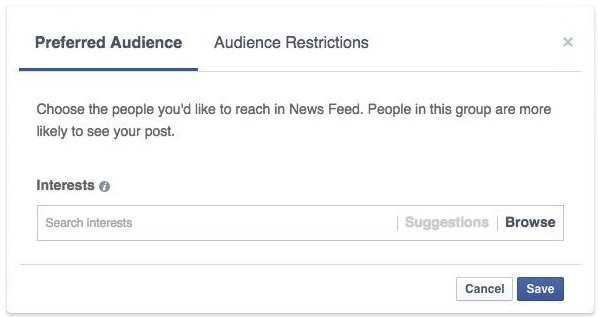
AudienceOptimizationPreferredAudience1
Audience restrictions – Gives publishers the option to limit the visibility of certain posts across Facebook by specifying which audiences would not find a post relevant, based on their location, language, age or gender. This is an existing feature that can be used alongside preferred audience options.
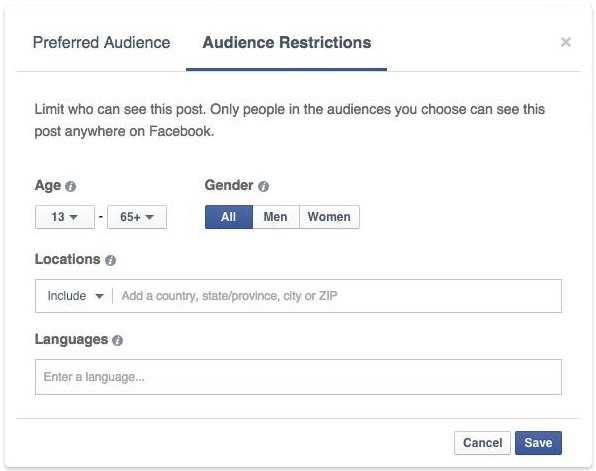
AudienceOptimizationAudienceRestrictions2
Audience insights – Gives publishers visibility into the performance of their content, down to the post level with breakdowns by interest tag. This is in addition to the existing Page insights product. Once a post is published, insights for the preferred audience can help publishers understand how different subsets of people are responding by showing reach and engagement metrics for each interest tag.
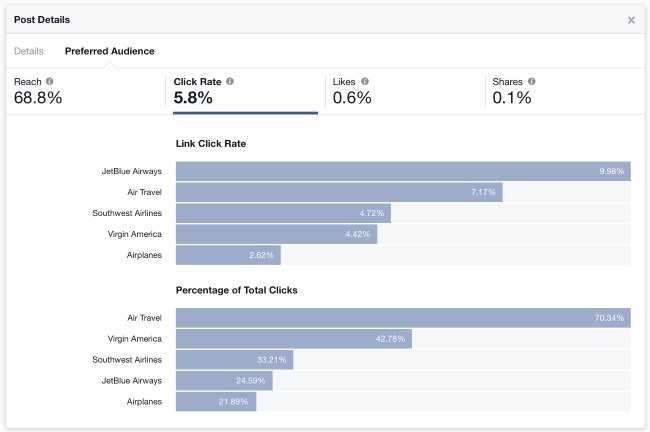
AudienceOptimizationAudienceInsights3
Facebook’s Get Started page for Audience Optimization provided the following instructions for page administrators who want to begin using the features:

AudienceOptimizationAllow4

  • Go to your page.
  • Click settings in the top-right-hand corner.
  • Click general in the tab column on the left side of the page.
  • Find the row labeled “Audience Optimization for Posts” in the middle of the page and click edit.
  • Check off the box that that allows you to begin using the feature.

The tool is rolling out gradually to English-language Pages over the next week.
Want to learn more?

    Select
    Demand
    Brand
    Agency
    DSP
    Supply
    App Developer
    Others
    Ad Network Owner
    Tech Vendor
    Other/Not Sure
    Select
    Demand
    Brand
    Agency
    Others
    Ad Network Owner
    Other/Not Sure
    Select
    Demand
    Brand
    Agency
    Supply
    Media House
    Others
    Ad Network Owner
    Tech Vendor
    Other/Not Sure
    Select
    Demand
    Brand
    Agency
    Supply
    Web Publisher
    App Developer
    SSP
    Media House
    Others
    Ad Network Owner
    Tech Vendor
    Other/Not Sure
    Select
    Supply
    Web Publisher
    App Developer
    SSP
    Media House
    Others
    Ad Network Owner
    Other/Not Sure
    Select
    Demand
    Brand
    Agency
    DSP
    Supply
    Web Publisher
    App Developer
    SSP
    Media House
    Others
    Ad Network Owner
    Tech Vendor
    Other/Not Sure
    You Might Also Like
    Creative Studio for publishers and advertisers

    Admixer Creative Studio – creative management solution that simplifies and automates work with various types of advertising formats, significantly saving resources and increasing efficiency. Now the workflow of creating and testing creatives is as simple as possible, giving publishers and advertisers more control over the display of promo materials. Table of contents: About Admixer Creative […]

    Creative Studio for publishers and advertisers
    Creative Studio for publishers and advertisers

    Admixer Creative Studio – creative management solution that simplifies and automates work with various types of advertising formats, significantly saving resources and increasing efficiency. Now the workflow of creating and testing creatives is as simple as possible, giving publishers and advertisers more control over the display of promo materials. Table of contents: About Admixer Creative […]

    Read more
    Retailer's Data Monetization

    Retailers are becoming the new media giants. With access to billions of real shopper interactions — both online and in stores — they hold one of the most valuable datasets in advertising: commerce-validated first-party data. In today’s economic situation, when advertisers want more than just audience reach and impressions, but measurable outcomes, retailers’ data enables […]

    Data Monetization for Retailers
    Data Monetization for Retailers

    Retailers are becoming the new media giants. With access to billions of real shopper interactions — both online and in stores — they hold one of the most valuable datasets in advertising: commerce-validated first-party data. In today’s economic situation, when advertisers want more than just audience reach and impressions, but measurable outcomes, retailers’ data enables […]

    Read more
    contextual targeting vs cookie based targeting

    The digital advertising world is on the cusp of a major upheaval. Growing privacy concerns and tightening regulations are rapidly eroding the dominance of third-party cookies, the long-standing backbone of behavioral cookie targeting. This shift is pushing advertisers towards a new frontier – contextual advertising, with header bidding platforms emerging as a crucial ally in […]

    contextual targeting vs cookie based targeting
    Contextual targeting vs Cookie Targeting

    A publisher's guide to thriving in the cookieless future. Learn how contextual targeting and header bidding maximize ad revenue while respecting privacy.

    Read more

      Stay updated with Admixer
      Privacy Policy